A cPanel server under a DDoS attack can become slow, return 502 or 503 errors, exhaust its web workers or stop responding completely. The urgent question is not simply which IP addresses to block. You first need to establish what is being exhausted, which domain is being targeted and whether the traffic can be controlled on the server at all.
An HTTP flood that keeps PHP and Apache busy needs a different response from a network flood that fills the connection before traffic reaches cPanel. A burst of failed WHM logins is different again. Treating all three incidents as the same problem wastes valuable time and can block legitimate visitors without stopping the attack.
This guide explains how to identify and block a DDoS attack on a cPanel server using a measured incident response process. It also shows where server-side tools, a reverse proxy, your hosting network and BashEdge cPanel security and DDoS protection fit into that response.
Run these checks only on a server you are authorized to administer. Access logs and process output can contain customer domains, source addresses and account details. Keep raw evidence private and sanitize it before sharing.
First Decide Which Type of DDoS Attack You Are Facing
Do not begin with a long list of firewall commands. Begin by classifying the failure. The location of the bottleneck determines which control can help.
| What you observe | Likely problem | Best first response |
|---|---|---|
| The server is reachable, but Apache, PHP or LiteSpeed is overwhelmed by web requests | Application layer HTTP flood | Identify the target, then challenge, rate limit or block the abusive request pattern |
| WHM, SSH and websites are all unreachable while the network interface or provider link is saturated | Network or transport layer flood | Contact the network provider and enable upstream DDoS mitigation |
| Failed WHM, cPanel, mail or SSH logins are increasing | Brute-force attack | Use cPHulk or an intrusion prevention control designed for authentication abuse |
| One account uses heavy PHP or MySQL resources without a clear request surge | Application or performance fault | Follow a cPanel high load investigation before treating it as DDoS |
This distinction matters because no local firewall can recover bandwidth that has already been filled upstream. In that situation, the provider must filter the traffic before it reaches the server. Server-side protection is most useful when the server still receives and can inspect the request.
cPHulk is also commonly misunderstood. cPanel documents it as protection against brute-force attempts to cPanel, WHM, mail, FTP and SSH services. It is useful for those attacks, but it is not a general website DDoS filter. See the official cPHulk Brute Force Protection documentation for its actual scope.
Take an Incident Snapshot Before Restarting Services
Restarting Apache or PHP may briefly restore a website, but it also clears active workers and removes useful evidence. Record a small snapshot first if the server is still accessible:
date -u
uptime
nproc
vmstat 1 8
free -m
ss -s
ps -eo pid,user,comm,%cpu,%mem,stat,etime --sort=-%cpu | head -25
This snapshot tells you when the investigation began, how the load compares with the CPU count, whether work is waiting for CPU or storage, how much memory remains, how many connections exist and which processes are busiest.
Read the result as a group rather than reacting to one number. For example:
- High Apache, LiteSpeed or PHP usage with a sharp increase in established connections supports an HTTP flood diagnosis.
- High software interrupt or system CPU can accompany heavy packet processing.
- Low CPU use with an unreachable server can indicate that the bottleneck is outside the operating system.
- A busy MySQL process may be the effect of repeated expensive requests, not the original cause.
- A high 5 or 15 minute load can remain after the attack has already slowed.
Keep this output with the incident record. It gives you a baseline for proving whether a mitigation improved the server.
Find Which cPanel Domain Is Receiving the Flood
On a server with many cPanel accounts, the server load does not reveal the target. You need to map current activity to a virtual host.
Check the live web server view
WHM includes Apache Status under Server Status. It can show current requests, worker activity and traffic information when Apache status support is available. cPanel notes that this interface is not compatible with LiteSpeed. The official WHM Apache Status guide explains the interface and its limitations.
Look for the same hostname or request path appearing repeatedly. Do not assume that a high request count alone is malicious. A legitimate campaign, search crawler or monitoring system can also create a short burst.
Rank recent requests in the domain logs
cPanel normally stores Apache access data in /etc/apache2/logs/access_log and per-domain logs under /etc/apache2/logs/domlogs/. These paths are listed in cPanel's Apache documentation.
The following command ranks domain logs by entries from the current minute:
minute=$(date '+%d/%b/%Y:%H:%M')
find /etc/apache2/logs/domlogs -maxdepth 1 -type f -print0 \
  | xargs -0 -I{} sh -c 'count=$(grep -c "'"$minute"'" "{}" 2>/dev/null); [ "$count" -gt 0 ] && printf "%8d %s\n" "$count" "{}"' \
  | sort -nr \
  | head -20
The result contains real domain names, so keep it private. Once one log is clearly receiving most of the traffic, inspect that file rather than applying restrictions across every customer account.
Measure the Request Pattern in the Target Log
Set the path to the affected domain log. Replace the example with the real log only on the server:
LOG=/etc/apache2/logs/domlogs/example.comFind the most frequent source addresses in a recent sample:
tail -n 20000 "$LOG" \
  | awk '{print $1}' \
  | sort | uniq -c | sort -nr | head -20
Find the most requested methods and paths:
tail -n 20000 "$LOG" \
  | awk -F'"' '{print $2}' \
  | awk '{print $1, $2}' \
  | sort | uniq -c | sort -nr | head -30
Count response status codes:
tail -n 20000 "$LOG" \
  | awk '{print $9}' \
  | sort | uniq -c | sort -nr
You are looking for a pattern that explains the resource pressure:
- One expensive uncached page requested thousands of times
- Repeated traffic to login, search, XML-RPC or API endpoints
- Many changing source addresses requesting the same small set of paths
- Large volumes of 404 responses that still invoke the application
- A single source opening many connections unusually quickly
- A sudden increase in 502, 503 or 504 responses as workers become unavailable
A top source address is evidence, not a verdict. It may belong to a reverse proxy, carrier network or legitimate crawler. If the site uses a proxy, confirm that Apache is recording the verified visitor address before blocking anything. Otherwise, you may block the proxy itself or make decisions using the wrong field.
Also compare the current sample with a normal period. A request rate is meaningful only in the context of the site's usual traffic and the cost of the requested page.
Block or Challenge the Traffic at the Right Layer
The safest useful mitigation is the narrowest rule that matches the abusive behavior. A global block may be quick, but it can create a second outage for legitimate users.
Use upstream protection for network saturation
If the server's network path is full, open an urgent case with the hosting or network provider. Give them the attack start time, destination address, affected protocol and any flow information you can collect safely. Ask whether they can apply scrubbing, filtering or a temporary route change upstream.
A correctly configured upstream proxy or filtering service can help protect HTTP and HTTPS traffic before it reaches the cPanel server. This is most effective when the origin address is not publicly exposed through old DNS records, direct service hostnames or application configuration.
During an active Layer 7 incident, an upstream challenge can reduce automated requests before they reach Apache, LiteSpeed or PHP. Apply it only as broadly and for as long as necessary because additional visitor checks can also affect legitimate access, monitoring and analytics.
Temporarily block a confirmed single offender
If ConfigServer Security & Firewall is installed and one address is clearly abusive, a temporary block can reduce immediate pressure:
csf -td 203.0.113.44 3600 "temporary HTTP flood block"The example address is reserved for documentation. Replace it only after verifying the real source. CSF is a third-party tool and is not installed on every cPanel server.
Avoid scripts that automatically block the top 100 addresses from one log sample. Distributed attacks rotate sources, and a blunt list can include search engines, monitoring systems, office gateways and legitimate visitors. A temporary, documented rule is easier to review and reverse.
Use ModSecurity for malicious request patterns
ModSecurity can reject application requests that match a defined rule before they reach vulnerable application code. cPanel recommends enabling ModSecurity for hosted domains, and WHM's ModSecurity Tools interface provides rule and hit management. The official ModSecurity documentation covers domain controls, while ModSecurity Tools covers WHM management.
The OWASP Core Rule Set can provide a maintained baseline, but security rules can produce false positives. Review hits and test any custom rule against legitimate traffic before enabling it broadly. cPanel's OWASP ModSecurity CRS guidance specifically warns administrators to review deployment and false-positive risk.
ModSecurity is useful when the malicious requests have identifiable application characteristics. It is not a substitute for upstream filtering when packets are saturating the network.
Where BashEdge Fits on a cPanel Server
BashEdge is built by our BashPilot team for cPanel administrators who need application-aware protection inside WHM. It combines a web application firewall, Layer 7 DDoS controls, server firewall functions and intrusion prevention in one native cPanel plugin.
The distinction between Layer 7 protection and upstream network protection is important. BashEdge can inspect and act on HTTP requests that reach the cPanel server. It can identify high-rate clients, distributed scans, hostile bots and rotating request patterns. It cannot create more network capacity or replace provider-level scrubbing when a volumetric attack has already saturated the server's connection.
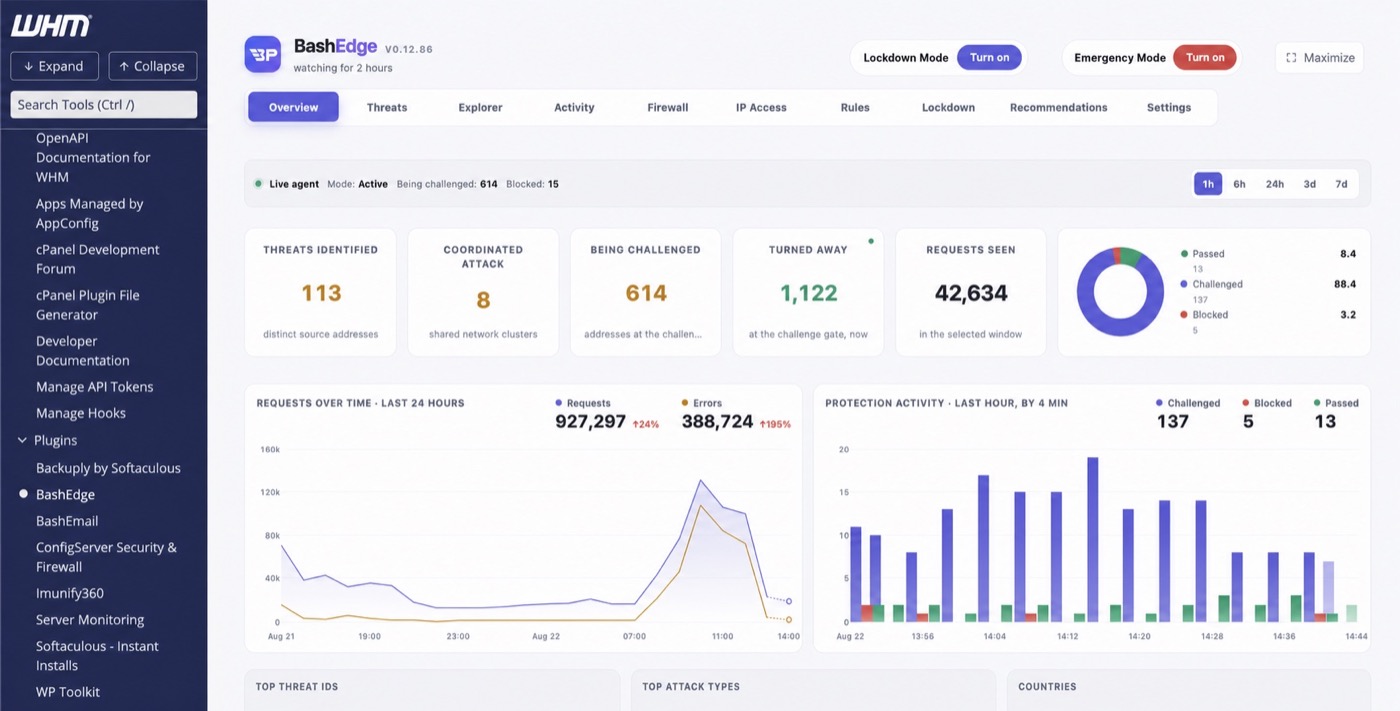
The privacy-safe dashboard above shows a real BashEdge incident view inside WHM. In the selected window, the interface reports 113 threat sources, 8 coordinated network clusters, 614 addresses being challenged, 1,122 requests turned away and 42,634 requests observed. The chart makes the change in request and error volume visible without exposing a customer domain or server address.
For a cPanel DDoS response, BashEdge provides several practical advantages:
- One installation can protect every cPanel account and hosted domain.
- Monitor mode lets an administrator observe decisions before enforcing them.
- Lockdown Mode can be applied to one affected domain or across hosted sites during an incident.
- The WHM dashboard shows sources, coordinated activity, target information and actions in one place.
- Requests can be passed, challenged or blocked based on the observed behavior.
- It is designed to work alongside existing firewall and upstream protection rather than hiding them.
Lockdown Mode analyzes each new connection in detail
Lockdown Mode is the selective response for an active application-layer flood. BashEdge performs deeper analysis of each new connection and its request behavior, then verifies visitors before allowing their traffic to consume Apache, LiteSpeed, PHP or the hosted application.
An administrator can apply Lockdown Mode to the domain under attack or across hosted cPanel accounts when the shared Web server is affected. It is suitable when the server remains reachable, source addresses are rotating and legitimate browsers, verified crawlers and allowlisted services must continue. Watch the passed, challenged and blocked decisions after activation so unexpected application behavior can be identified quickly.
Emergency Mode contains a severe server-wide attack
Emergency Mode is intended for a severe application-layer DDoS incident that is threatening the stability of the cPanel server. It moves protection into a more aggressive containment posture when worker capacity is disappearing and normal selective controls are not reducing the request pressure quickly enough.
Use it as an incident control rather than a permanent default. Record when it was enabled, monitor legitimate customer traffic and reduce the protection level after the server has stabilized. Emergency Mode acts on requests that reach the server. It cannot replace provider-level filtering when an upstream network link is already saturated.
This is especially useful during a distributed HTTP flood where blocking a handful of IP addresses has little effect. The request pattern, target and coordination matter more than any one source.
Review the full BashEdge cPanel security and DDoS protection feature set. When deploying it on an authorized cPanel server, begin in monitor mode, confirm how legitimate traffic is classified and document any allowlists before switching on broader enforcement.
Confirm That the cPanel Server Has Recovered
Stopping visible errors is not enough. Repeat the initial snapshot and compare it with the baseline:
date -u
uptime
vmstat 1 8
ss -s
ps -eo pid,user,comm,%cpu,%mem,stat,etime --sort=-%cpu | head -25
Then review a fresh sample from the affected domain log:
tail -n 5000 "$LOG" \
  | awk '{print $9}' \
  | sort | uniq -c | sort -nr
Check for all of the following:
- The 1 minute load is falling and no new run queue is building.
- Apache, LiteSpeed or PHP workers are available for normal requests.
- The rate of 502, 503 and 504 responses is returning to its baseline.
- Connection counts are stable rather than immediately rising again.
- Legitimate visitors can load dynamic and static pages.
- The mitigation is logging enough information for later review.
The 5 and 15 minute load averages fall slowly, so they may remain high after recovery. Use current worker availability, response codes and fresh resource samples to judge the immediate state.
Keep watching after the first improvement. Attack traffic often returns when a temporary rule expires or moves to a different URL.
Build a Safer cPanel DDoS Response Plan
The best time to prepare for a DDoS incident is before a customer reports an outage. A useful cPanel response plan should include:
- A current list of provider escalation contacts and the evidence they request
- Alerts for abnormal request rate, worker exhaustion, network traffic and repeated 5xx responses
- A documented method for finding the busiest cPanel domain and request path
- A reverse proxy or upstream mitigation option for public websites
- ModSecurity enabled with rules that have been tested against production traffic
- cPHulk configured for authentication services without treating it as website DDoS protection
- Temporary firewall procedures with an owner, reason, expiry time and rollback step
- An allowlist for known monitoring, office and integration addresses where appropriate
- A private incident log that records times, symptoms, changes and results
- A review after every incident so the next response is faster and more precise
Do not expose the origin address unnecessarily when a site is intended to remain behind a proxy. Also review DNS history, mail services and other records that may reveal the same address. Origin protection is a system design task, not just a DNS switch.
If the server hosts several unrelated customers, test every new rule against more than the targeted domain. A mitigation that protects one application can accidentally break an API, payment callback, search crawler or remote administration workflow elsewhere on the server.
When to Bring In cPanel Server Support
Bring in an experienced administrator when the server is still unstable, the attack layer is unclear, several customer accounts are affected or a production change carries a high risk of blocking legitimate traffic.
A useful support response should do more than restart services. It should identify the affected domain and request pattern, separate the attack from unrelated performance problems, apply a reversible mitigation, coordinate with the provider when necessary and document what changed.
iServerSupport provides cPanel server management for infrastructure you already own or rent. We do not sell hosting servers. Our work covers cPanel administration, performance diagnosis, security hardening, monitoring and incident response. If an active event needs immediate investigation, use our emergency server support. For preventive hardening and firewall review, see our server security service.
cPanel DDoS Questions
Can cPanel itself stop a DDoS attack?
cPanel provides security and logging tools that help with investigation and some forms of abuse, but no control panel can stop every DDoS attack. Network saturation requires upstream mitigation. Application layer floods can often be reduced with a reverse proxy, WAF, behavioral controls and carefully tested request rules.
Does cPHulk stop website DDoS attacks?
No. cPHulk is designed for brute-force login protection across cPanel, WHM, mail, FTP and SSH services. It should be part of cPanel hardening, but it is not a replacement for application layer or network DDoS protection.
Should I restart Apache during a DDoS attack?
A restart can clear stuck or exhausted workers, but it does not remove the incoming traffic. Capture evidence first when possible, identify the target and apply a control that addresses the request pattern. Restart only when it is operationally necessary and monitor whether workers become exhausted again.
Does upstream proxy protection replace server-side protection?
No. A reverse proxy can absorb and challenge substantial traffic before it reaches the origin, but the origin still needs secure configuration, application protection and monitoring. You must also prevent direct origin access where the architecture allows it.
Can BashEdge stop a volumetric network attack?
BashEdge is designed for application-aware protection on the cPanel server, including Layer 7 DDoS activity. If the provider link is already saturated, filtering must happen upstream. BashEdge complements provider or proxy protection by controlling the requests that still reach the server.
What is the difference between Lockdown Mode and Emergency Mode?
Lockdown Mode performs deeper connection analysis and visitor verification during an active HTTP flood. Emergency Mode uses a more aggressive containment posture when a severe application-layer attack threatens the stability of the whole cPanel server. Emergency Mode should be monitored closely and reduced after the immediate danger passes.
Need experienced cPanel and WHM support?
Our engineers manage cPanel servers, troubleshoot service failures and keep hosting systems secure and responsive.