
Running Jira behind a reverse proxy is common, but SSL termination is where most administrators get stuck. Misconfigurations lead to redirect loops, broken HTTPS, mixed-content warnings, or Jira refusing to load entirely.
The cleanest, most stable setup is to terminate SSL at HAProxy and pass traffic to Jira over HTTP.
If you want a secure, production-ready setup done by experts, explore our **Server Security Service** or **Linux Server Management** .
1. Why Use HAProxy for Jira SSL?
HAProxy gives you:
- Centralized SSL termination
- Proper handling of HTTP/HTTPS redirects
- Strong TLS configuration support
- Zero downtime reloads
- Ability to route traffic to multiple Jira nodes
- Better performance under load
- Cleaner network separation
- Easier certificate renewal (Let’s Encrypt or commercial SSL)
If you’re planning a clustered Jira setup, pair it with our **Proactive Server Management** .
2. Install HAProxy (Latest 2.x Version)
On CentOS/AlmaLinux/RHEL:
yum install haproxy -yOn Ubuntu/Debian:
apt install haproxy -yCheck version:
haproxy -vYou should ideally be running HAProxy 2.x , because older versions have weaker TLS defaults.
3. Prepare Your SSL Certificate
Place your certificate and key in:
/etc/haproxy/ssl/jira.pemIf using Let’s Encrypt:
cat fullchain.pem privkey.pem > /etc/haproxy/ssl/jira.pemSet permissions:
chmod 600 /etc/haproxy/ssl/jira.pem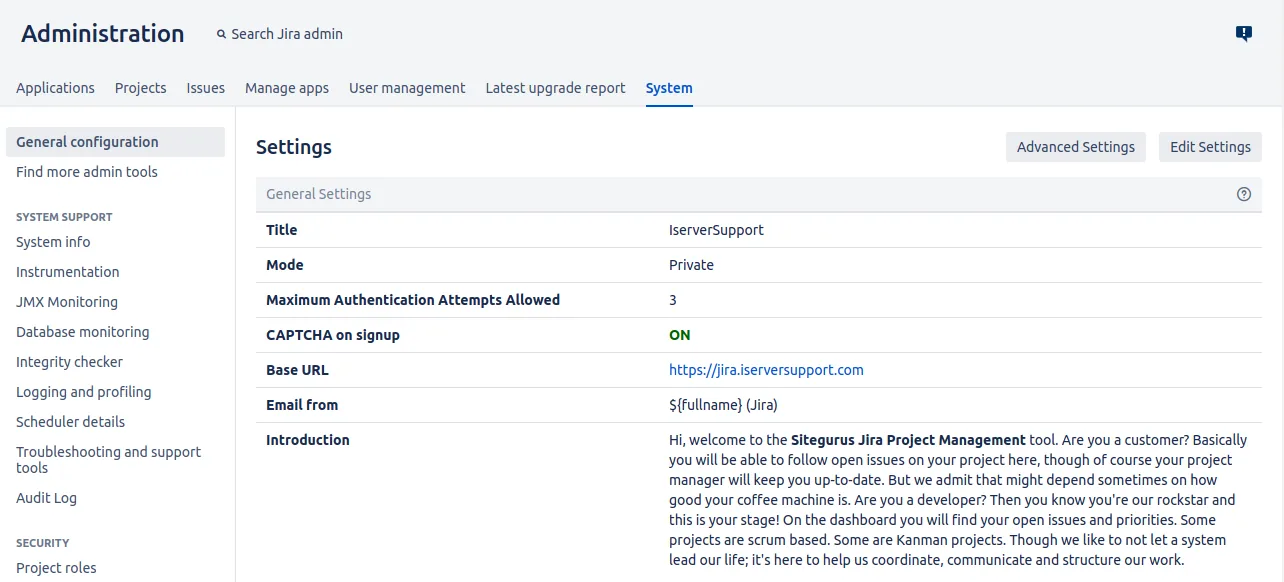
4. HAProxy Frontend Configuration (SSL Termination)
Edit:
/etc/haproxy/haproxy.cfgAdd:
frontend jira_https
bind *:443 ssl crt /etc/haproxy/ssl/jira.pem
mode http
option forwardfor
http-request set-header X-Forwarded-Proto https
default_backend jira_backend
Key points:
- SSL terminates at HAProxy
- X-Forwarded-Proto tells Jira the request is HTTPS
- forwardfor sets client IP headers
This prevents Jira from thinking the request is HTTP.
5. HAProxy Backend Configuration
Add:
backend jira_backend
mode http
option httpchk GET /status
server jira1 127.0.0.1:8080 check
Replace 127.0.0.1 with your Jira host if needed.
If using multiple nodes:
server jira1 10.0.0.10:8080 check
server jira2 10.0.0.11:8080 check
6. Configure Jira to Trust the Proxy
Edit:
/opt/atlassian/jira/conf/server.xmlFind the connector:
<Connector port="8080"
relaxedPathChars="[]|" relaxedQueryChars="[]|{}^\`"
protocol="org.apache.coyote.http11.Http11NioProtocol"
...
Modify it as follows:
<Connector port="8080"
protocol="HTTP/1.1"
scheme="https"
proxyName="yourdomain.com"
proxyPort="443"
secure="true"
redirectPort="443"/>
Replace:
- yourdomain.com → actual Jira URL
Without this, Jira will keep redirecting HTTP→HTTPS and break things.
7. Restart Services
Restart HAProxy:
systemctl restart haproxyRestart Jira:
systemctl restart jiraCheck HAProxy config:
haproxy -c -f /etc/haproxy/haproxy.cfg8. Common Problems & Fixes
❌ Jira always redirects back to HTTP
Fix:
You forgot scheme=”https” or proxyPort=”443″ .
❌ Browser shows “Mixed Content” warnings
Fix:
Update the Base URL inside Jira admin panel:
Jira Admin → System → General Configuration → Base URL:
https://yourdomain.com❌ SSL works, but Jira refuses to load
Fix:
Ensure:
http-request set-header X-Forwarded-Proto https❌ HAProxy reload fails
Fix permission errors:
chmod 600 /etc/haproxy/ssl/jira.pem❌ Client IP shows 127.0.0.1
Add:
option forwardforin the frontend.
9. Hardening SSL Configuration (Recommended)
Add:
ssl-default-bind-ciphers PROFILE=SYSTEM
ssl-default-bind-options no-sslv3 no-tlsv10
Or full hardening:
ssl-default-bind-options no-sslv3 no-tlsv10 no-tlsv11
ssl-default-bind-ciphers ECDHE-ECDSA-AES256-GCM-SHA384:TLS_AES_256_GCM_SHA384:TLS_AES_128_GCM_SHA256
Supports:
- TLS 1.2
- TLS 1.3
- Strong ciphers
10. Optional: HTTP → HTTPS Redirection
Add:
frontend jira_http
bind *:80
http-request redirect scheme https code 301
11. Final Checklist
- HAProxy SSL certificate installed
- SSL terminating on port 443
- Jira connector updated
- Base URL set to HTTPS
- X-Forwarded-Proto header added
- DNS updated
- Services restarted
Conclusion
Configuring SSL for Jira behind HAProxy is straightforward when you handle SSL termination, proxy headers, and the Jira connector
Need the certificate installed or repaired correctly?
We install and troubleshoot SSL certificates, certificate chains and web server configuration on infrastructure you control.